
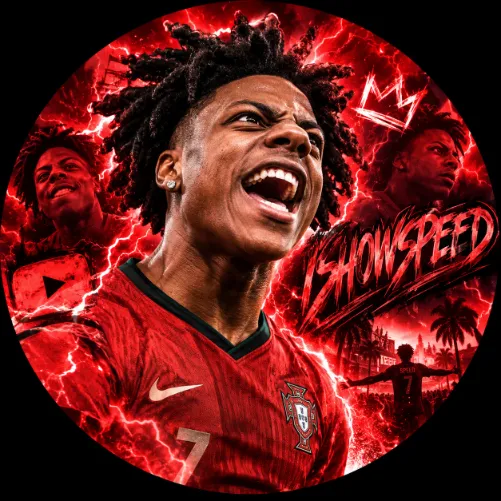
His wide-eyed reactions, football celebrations, and unpredictable expressions make excellent material for Discord avatars, TikTok accounts, Instagram profiles, and YouTube channels.
A good Speed PFP needs more than a random screenshot. Sharp image quality, proper cropping, and a clear facial expression can make your avatar look much better, especially inside a small circular frame.
Who Is IShowSpeed?
IShowSpeed, whose real name is Darren Jason Watkins Jr., is an American YouTuber, livestreamer, and online entertainer. He was born on January 21, 2005, in Cincinnati, Ohio.
His content features gaming, real-life livestreams, football-related videos, travel adventures, and comedy reactions. His admiration for Cristiano Ronaldo also inspires many fan-made profile pictures.
| Detail | Information |
|---|---|
| Online username | IShowSpeed |
| Real name | Darren Jason Watkins Jr. |
| Date of birth | January 21, 2005 |
| Birthplace | Cincinnati, Ohio, USA |
| Main platform | YouTube |
| Content | Livestreams, gaming, travel, comedy |
| Popular PFP styles | Funny, meme, anime, football, 4K |
| Popular avatar platforms | Discord, TikTok, Instagram, YouTube |
Best IShowSpeed PFP Ideas
Fans use different IShowSpeed profile pictures depending on their mood, favorite clips, and social media style. Some prefer hilarious reaction screenshots, while others go for dark edits, football themes, or animated artwork.
Funny IShowSpeed PFP
Funny IShowSpeed PFP images feature his exaggerated expressions, surprised looks, and hilarious livestream reactions.
A screenshot featuring his mouth wide open or an unexpected facial expression can give your account an instantly humorous appearance.
Popular options:
-
Screaming IShowSpeed face
-
Wide-eyed reaction photo
-
Laughing Speed avatar
-
Shocked facial expression
-
Funny livestream screenshot
These images work particularly well on Discord, TikTok, and gaming accounts.
IShowSpeed PFP 4K
An IShowSpeed PFP 4K offers a sharp, detailed appearance, especially for fans who prefer polished profile photos.
High-resolution source images preserve facial details during editing and resizing. A genuine 4K image measures 3840 × 2160 pixels in landscape orientation, although a square avatar can use different dimensions.
For the best result, start with a clear image, crop around Speed’s face, and export a square version.
IShowSpeed Anime PFP
IShowSpeed anime PFP designs turn his facial expressions into illustrated characters. Artists use bold outlines, bright colors, dramatic eyes, and animated backgrounds to create distinctive avatars.
Popular anime-inspired designs feature:
-
Glowing red or blue eyes
-
Spiky anime-style hair
-
Dramatic facial expressions
-
Manga-style black-and-white artwork
-
Colorful illustrated backgrounds
An anime Speed PFP works nicely for Discord, gaming communities, and anime-themed social accounts.
IShowSpeed Ronaldo PFP
IShowSpeed’s admiration for Cristiano Ronaldo makes football-themed profile pictures a popular choice among fans.
These avatars feature Speed wearing football jerseys, celebrating goals, or reacting to Ronaldo-related moments.
A Ronaldo-themed Speed PFP can feature Portugal’s national colors, football graphics, or fan-made celebration artwork.
IShowSpeed Meme PFP
An IShowSpeed meme PFP uses a funny screenshot or edited reaction to create a humorous online identity.
Fans frequently turn livestream expressions into memes through exaggerated cropping, captions, and visual effects.
Popular meme ideas feature Speed’s surprised face, dramatic reactions, or hilarious gaming moments.
For a small avatar, a close-up facial expression usually works better than a screenshot containing multiple characters.
IShowSpeed Dark PFP
A dark IShowSpeed PFP uses deep shadows, black backgrounds, dramatic lighting, and strong contrast.
This style suits gaming accounts and social profiles with a darker visual theme.
Black-and-white portraits, red glowing effects, and shadow-heavy edits can create an eye-catching result without overcrowding the image.
IShowSpeed Cute PFP
Cute IShowSpeed PFP designs use cartoon expressions, pastel backgrounds, and playful illustrations.
Chibi artwork, smiling portraits, and simplified character drawings make excellent choices for fans who prefer a cheerful avatar.
A cute Speed PFP can also feature hearts, stars, or soft-colored backgrounds.
Best IShowSpeed PFP Styles for Different Platforms
Different social platforms display profile images at different sizes. A square image with the face near the center provides a reliable starting point.
| Platform | Suggested PFP style | Recommended working size |
|---|---|---|
| Discord | Funny, anime, dark edits | 512 × 512 px |
| TikTok | Meme, screaming face | 1080 × 1080 px |
| HD portrait, aesthetic edit | 1080 × 1080 px | |
| YouTube | Clean portrait, football theme | 800 × 800 px |
| Cute, funny reaction | 640 × 640 px | |
| X | Meme, anime, HD portrait | 400 × 400 px |
These dimensions are practical editing targets rather than universal upload requirements. Each platform may compress or resize the final image.
How to Download an IShowSpeed PFP
Finding a suitable IShowSpeed profile photo takes only a few steps.
-
Search for an IShowSpeed PFP using Google Images, Pinterest, or a fan-art platform.
-
Open the original image rather than saving a tiny search thumbnail.
-
Check the image resolution before saving.
-
Download the picture in JPG, PNG, or WebP format.
-
Crop the image into a square using your phone’s photo editor.
-
Upload your new avatar to Discord, TikTok, Instagram, or another social platform.
For fan artwork, check the creator’s usage terms and provide credit where requested. Avoid downloading files from suspicious websites.
How to Make Your Own IShowSpeed PFP
Creating a custom Speed PFP gives you more control over the colors, background, and facial expression.
Start with a clear screenshot from an official IShowSpeed video or another image you have permission to edit.
Use Canva, Picsart, Photoshop, or a mobile photo editor to customize the picture.
Try these editing ideas:
-
Remove a distracting background.
-
Add a solid red, blue, or black background.
-
Increase contrast slightly to sharpen facial details.
-
Add a subtle glow around the subject.
-
Crop the face close enough to remain visible in a small avatar.
-
Save the finished image as a high-quality PNG.
Keep the main facial expression inside the center area so circular profile cropping does not cut off the eyes or mouth.
Where to Find HD IShowSpeed PFP Images
Several online platforms offer IShowSpeed screenshots, fan edits, and profile picture inspiration.
| Source | Best for |
|---|---|
| Google Images | HD portraits and livestream screenshots |
| Aesthetic edits, anime avatars, and memes | |
| YouTube | Original livestream moments and screenshots |
| DeviantArt | Custom fan artwork and illustrated portraits |
| TikTok | Reaction images and trending fan edits |
Search phrases such as IShowSpeed PFP HD, IShowSpeed funny PFP, IShowSpeed anime PFP, and IShowSpeed PFP 4K can help narrow the results.
Tips for Picking the Perfect IShowSpeed Profile Picture
A memorable avatar needs a clear subject and an expression that matches your online personality.
-
For gaming: Use a screaming face or dramatic anime edit.
-
For Discord: Pick a meme screenshot with a close-up expression.
-
For TikTok: Try a colorful reaction photo or a funny Speed meme.
-
For Instagram: Choose a sharp portrait with a clean background.
-
For football accounts: Use a Ronaldo-inspired Speed edit.
Avoid excessive text, heavy filters, and blurry screenshots. Small details can disappear after a platform reduces the image.
What does IShowSpeed PFP mean?
IShowSpeed PFP means an IShowSpeed profile picture. Fans use photos, screenshots, memes, and illustrated edits of the streamer as their social media avatars.
Where can I find a funny IShowSpeed PFP?
Google Images, Pinterest, and YouTube offer plenty of funny Speed expressions. Search for screaming faces, shocked reactions, or memorable livestream screenshots.
Can I use an IShowSpeed PFP on Discord?
Yes. Discord allows users to upload custom profile pictures. A square image with a centered face works particularly well for its circular avatar display.
How can I get an IShowSpeed PFP in 4K?
Look for a high-resolution original image or capture a frame from a high-quality video. Enlarging a low-resolution screenshot alone cannot restore missing details.
Can I use an IShowSpeed anime PFP?
Yes. Anime-style fan artwork makes an excellent personal avatar. Respect the artist’s permissions, especially for commercial accounts.
Which IShowSpeed PFP looks best?
A funny reaction image works well for meme accounts, while a clean HD portrait suits a more polished profile. Anime edits and dark-themed avatars offer additional creative options.
Also check out our Aesthetic Raccoon PFP collection.